
For founders and small teams doing their own outreach
Cold email and follow-ups from your own Gmail.
Write your email and follow-ups. ColdMerge fills in details from your list, spaces out the sends, and stops follow-ups when it detects a reply. You handle the conversations in your usual inbox.
14 days free. No card required. Sends from your own mailbox. Trial details
ColdMerge, connected to Gmail. Shown with demo data.
Campaign emails are sent through your connected Gmail account and appear in its Sent folder.
Sending windows and gradual ramp-up are built in, with randomized gaps between messages.
Cancel yourself from the billing page. No ticket to file.
How it works
From your list to a conversation, in three steps.
Connect your Gmail account.
Connect Gmail or Google Workspace through Google's consent screen. Your campaign emails are sent from that account and appear in its Sent folder.
Takes about a minute. Revoke any time from your Google Account.
 ColdMerge wants access to your Google Account
Schematic of Google's consent screen. Not a real capture.
Schematic of the sequence editor, previewing each person in turn. Demo data.
Write your email and follow-ups.
Import your list, add fields such as a first name or company, and choose the gaps between follow-ups. Review your campaign before you start it.
One thread per person. Follow-ups reply to the original email.
Let the campaign run. Pick up the replies.
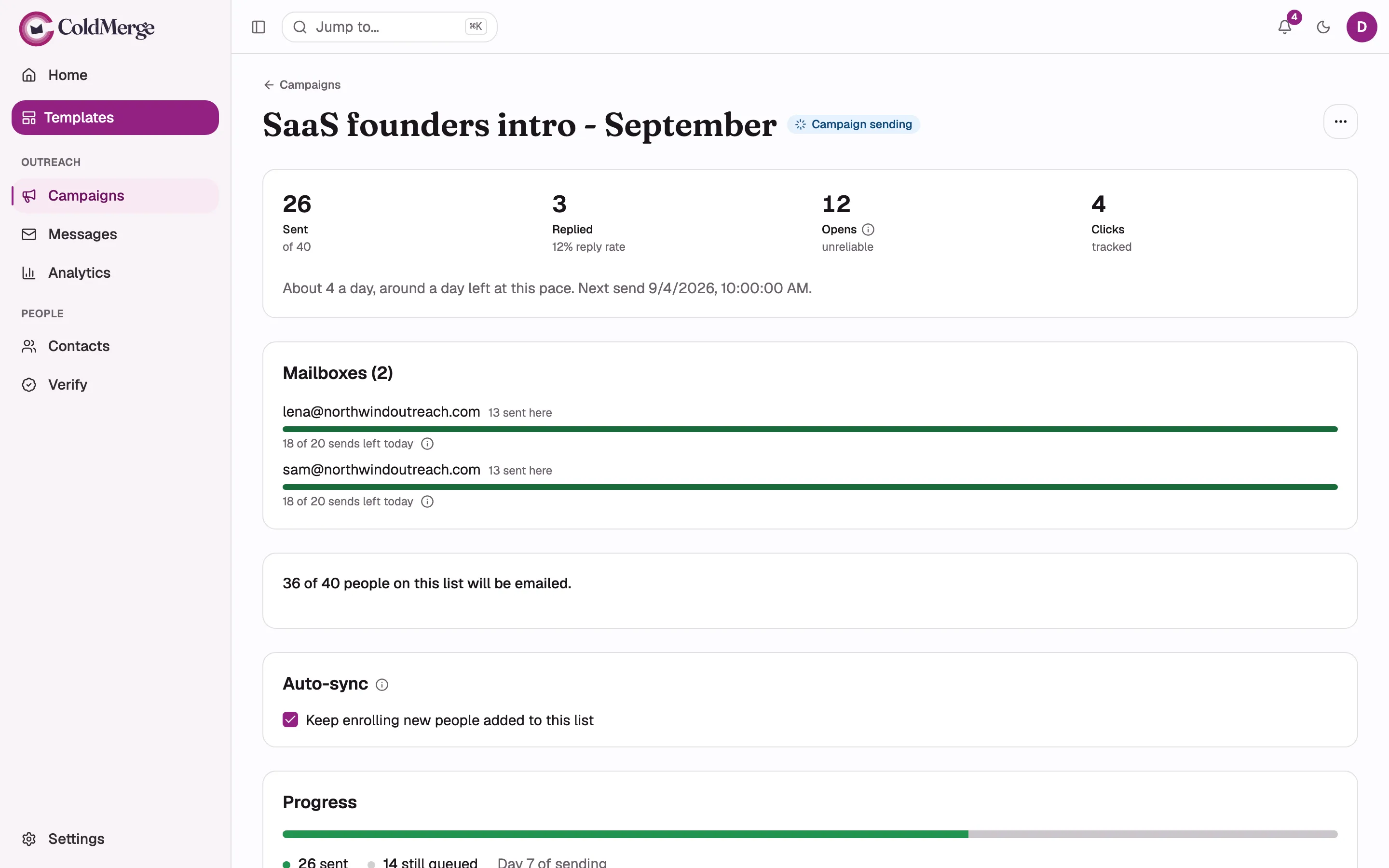
ColdMerge sends within your mailbox's allowance and sending window. Replies arrive in your usual inbox. When it detects a reply or bounce, it stops that person's remaining follow-ups.
Real campaign screen, shown with demo contacts.
What it takes off your plate
Keep the personal part.
Hand off the repetition.
For founders, freelancers and small sales teams who choose their prospects, write their own messages and handle the replies themselves. Sending each message and tracking every follow-up should not take the rest of your afternoon.
Merge fields
Personalize without starting from scratch.
Write the message once, with fields from your list. ColdMerge fills them in for every recipient, email and follow-ups alike. Watch it move through the list, or pick a person.
Keep follow-ups off your to-do list.
Choose the sequence and timing upfront. ColdMerge checks for replies and bounces so it can stop the remaining follow-ups when it detects either.
Manage your connected mailboxes together.
Run a campaign across several mailboxes from one place. ColdMerge distributes sends across them, subject to each mailbox's sending allowance.
Respect the people who opt out.
Campaign emails include an unsubscribe link. ColdMerge checks your suppression list before each send, so you do not have to maintain an extra “do not email” spreadsheet.
Campaign detail
A sequence that knows when to stop.
Each person moves through your sequence on their own timeline. The moment ColdMerge detects a reply or a bounce, the rest of that person's follow-ups are cancelled. Everyone else keeps going.
Sending controls
Slower on purpose. Clear about why.
A new mailbox starts at up to 20 emails a day in ColdMerge. Its allowance grows gradually as it ramps up. You can set your own daily cap and choose the hours it sends in, with a randomized gap between messages.
If a campaign is waiting, you can see which sending limit is holding it back. You do not have to guess why the next email has not gone out.
ColdMerge does not use a warm-up pool or manufacture conversations from your mailbox. It sends the campaign messages you configure, through your connected Gmail account.
These controls govern sending volume and timing. They do not guarantee inbox placement or prevent Google from restricting an account.
Ramp steps as ColdMerge applies them. A Workspace mailbox keeps climbing past 100. Counts are demo data.
Mailbox access
Know what you're connecting.
Connecting a mailbox is the biggest decision on this page. Here is exactly what ColdMerge asks for through Google's consent screen, what it does with it, and what it does not do.
Send email as you
Sends your campaign emails and follow-ups from the connected account. They appear in that account's Sent folder like any other message you send.
Read-only mailbox access
Detects replies and bounces so ColdMerge can stop follow-ups. This permission covers reading mail in general, not only campaign replies.
Basic account information
Your email address and basic profile, used to identify the mailbox inside ColdMerge.
You can revoke ColdMerge's access at any time from your Google Account permissions. Once revoked, ColdMerge can no longer send from or read that mailbox.
Compared
How ColdMerge differs from the alternatives.
Most of these send through Gmail too. The differences are where you work, how sending accounts are priced, whether a warm-up pool is involved, and how much control you get over pace.
ColdMergeCompetitor details are from each vendor's own pricing page, read on 14 September 2026, and may change. ColdMerge is not always the lowest-priced option: for a single mailbox, Mailmeteor's and YAMM's entry plans cost less. Instantly suits high-volume teams that want a warm-up pool; ColdMerge deliberately does not offer one.
Pricing
Choose how many inboxes you need.
Plans are priced by connected inboxes, not per person. Every plan includes follow-ups, ramp-up, rotation and suppression. Annual billing gives you 12 months for the price of 10.
Starter
$19/month
$190 a year
- Up to 3 connected inboxes
- Follow-ups, ramp-up, rotation, suppression
- Sending is never metered
Growth
$49/month
$490 a year
- Up to 10 connected inboxes
- Everything in Starter, plus your own tracking domain
- Sending is never metered
Need more than 10? $4 per extra inbox each month, so 15 inboxes is $69.See every inbox count
Your first campaign, set up with me. A 45-minute call with the founder: bring your Gmail account, a prospect list and a draft message, and we connect your mailbox, import your list and configure the sending window and follow-ups together. If something needs fixing before you send, we find it on the call.
Trial details
Written out here, not hidden in a tooltip.
FAQ
Before you connect your mailbox.
Straight answers to the questions that matter most before you hand a tool your sending account.

Put your next campaign in motion.
Write the messages. Set the follow-ups. Handle the replies in Gmail.
14 days free. No card required. Sends from your own mailbox.